

Printing Collate Meaning: How and Why It Matters
Introduction
Have you ever seen the “Collate” option when printing and wondered what it really means? Understanding printing collate meaning is essential, especially for multi-page documents. Collating ensures your pages are in the correct order, saving time and avoiding frustration.
In this guide, we’ll explain what does collate mean when printing , and why it matters helping you print efficiently whether you’re at home, in the office, or using a commercial printer.
What Does Collate Mean in Printing?
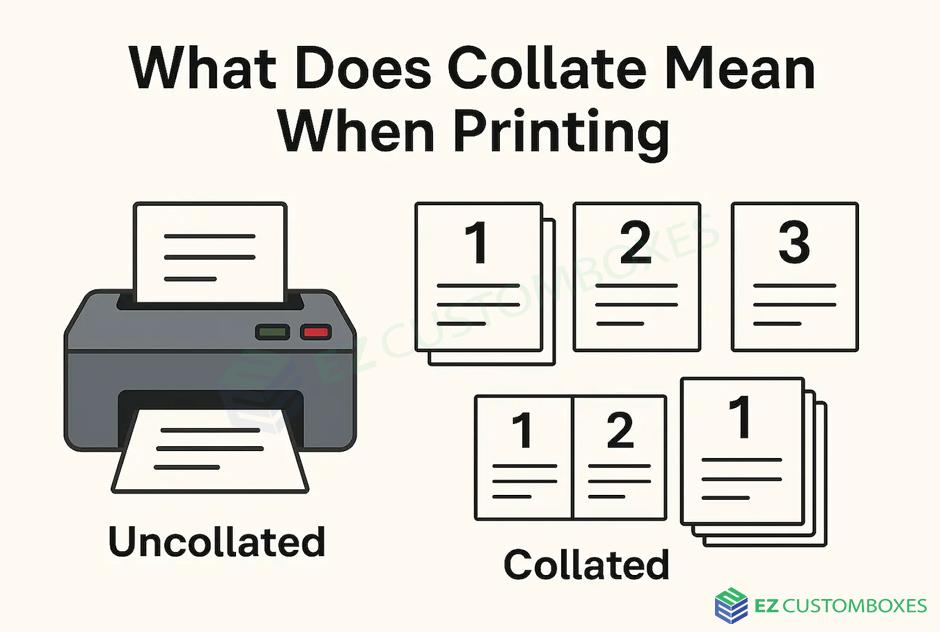
In simple terms, collate means arranging printed pages in a specific sequence. When printing multiple copies of multi-page documents:
-
Collated Printing: Each set comes out in order (1,2,3… 1,2,3…).
-
Uncollated Printing: Pages print in groups by page number (1,1,1… 2,2,2…).
Example:
If you print three copies of a 3-page document:
| Type | Page Order Output |
|---|---|
| Collated | 1,2,3 |
| Uncollated | 1,1,1 |
How Collate Works in Printers
Collate is a software and printer function that automatically arranges pages:
-
Select Number of Copies – Choose how many complete sets you need.
-
Enable Collate Option – Usually a checkbox in the print dialog.
-
Printer Sorts Pages Automatically – Printer outputs pages in sequential sets.
Tip: Not all printers support automatic collating, especially older models. Manual sorting may be needed.
Why Collate Matters
1. Saves Time
-
Eliminates manual page sorting
-
Reduces risk of mixing pages
2. Ensures Accuracy
-
Prevents misordered documents
-
Essential for contracts, reports, or presentations
3. Enhances Professionalism
-
Produces neatly organized sets
-
Avoids confusion for recipients
Collate vs Uncollated Printing
| Feature | Collated | Uncollated |
|---|---|---|
| Page Order | 1,2,3 | 1,2,3 |
| Best Use | Multi-page sets | Single-page batches |
| Manual Sorting | Not needed | Required |
| Time Efficiency | Fast | Slower |
Tips for Using Collate Effectively
-
Always check printer settings before printing large batches.
-
Use collate for presentations, reports, or multi-page documents.
-
Consider uncollated printing only for single-page copies or high-volume single-page printing.
Frequently Asked Questions (FAQ)
What does collate mean when printing a document?
The collate meaning pages in order so each printed set is complete (1,2,3… 1,2,3…).
How do I enable collate in my printer settings?
Most printers have a “Collate” checkbox in the print dialog. Check it to print pages in sequential sets.
Is collate necessary for single-page documents?
No. Collate is only useful for multi-page documents.
Can I collate manually if my printer doesn’t support it?
Yes, you can sort printed pages manually into complete sets.
Why would I choose uncollated printing?
Uncollated printing is faster for single-page batches or when using separate printers for each page.
Final Takeaway
Understanding the collate meaning printer and your documents are organized and professional. Whether printing at home, in the office, or at a commercial printer, collating helps keep your multi-page documents neat and ready to use.
Next step: Always check the collate option before printing multi-page documents to ensure every copy comes out in order.

 English
 Arabic
 French
 Spanish
 Portuguese
 Turkish
 Dutch
Dutch
 Italiano
 Russian
 Romaian
 Portuguese (Brazil)
 Greek
Greek