

What Makes an Ergonomic Gaming Chair Better Than a Regular Office Chair?
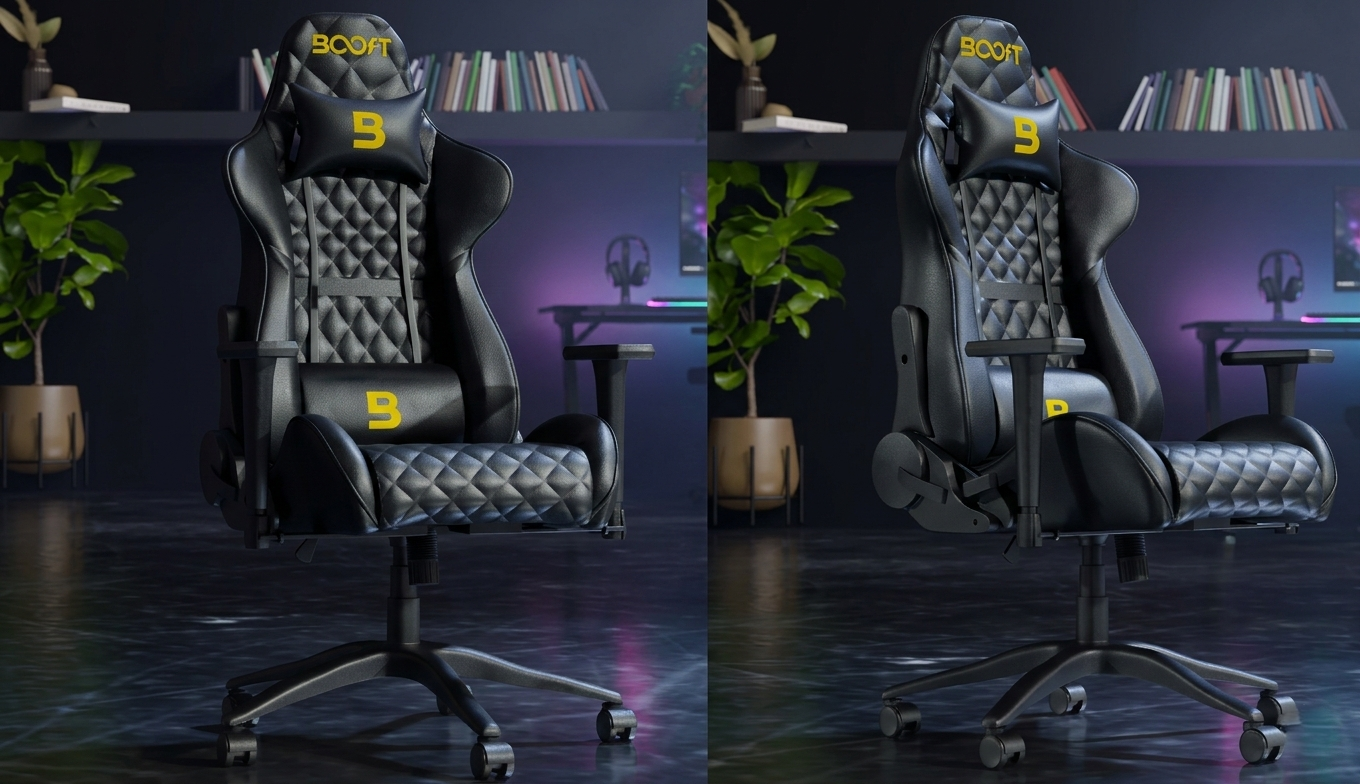
You spend hours every day sitting—sometimes typing reports, sometimes grinding ranked matches—and by evening your back feels locked, your neck is stiff, and your legs go numb. That end-of-day soreness is common in Pakistan, where people mix long desk work, online classes, and gaming sessions in the same seat. Regular office chairs look simple and professional, but they often lack the support needed for extended use. Ergonomic gaming chairs, on the other hand, combine strong posture support with extra padding, deeper recline, and adjustable features that keep your body comfortable longer. From humid Karachi home offices to Lahore gaming setups, the right chair reduces fatigue so you finish the day feeling normal instead of wrecked. The best gaming chairs in Pakistan now include ergonomic elements like adjustable lumbar and breathable materials, making them stand out for both work and play. When a chair matches how long you sit and how you sit, the difference shows up in how fresh you feel when you finally stand up.
A chair that supports your body properly doesn’t just feel good—it keeps you going longer.
Why Does Extended Sitting Cause So Much Strain?
Sitting for long periods puts steady pressure on your body in ways it wasn’t designed to handle over hours. Your spine naturally curves in an S shape, but most regular chairs force it flat or rounded, adding strain to the lower back that turns into aching by evening. Neck muscles tighten when you lean forward to see the screen, pulling shoulders up and creating knots that last days. Legs pressed against a hard seat edge cut blood flow, leaving feet tingling or numb after a few hours. In Pakistan’s warm climate, chairs with poor ventilation make your back and thighs sweat, adding irritation and discomfort on top of muscle fatigue. Without proper support, your body compensates by shifting constantly, which tires muscles faster and leads to poor posture habits. After a full day of work or gaming, you stand up feeling stiff, sore, and low on energy instead of ready to move. The chair plays the main role in whether you finish your day feeling okay or feeling wrecked.
How Does Lumbar Support Make Gaming Chairs Better?
Lumbar support in ergonomic chairs keeps your lower back in its natural curve, reducing strain during long sitting sessions.
- Built-in or adjustable lumbar curve holds your spine: Keeps the natural inward bend at the lower back, preventing the slouch that causes pain after hours of gaming or work at the desk.
- Thicker, contoured padding distributes pressure evenly: Spreads weight across a larger area so no single spot gets sore, giving relief that lasts through full sessions without constant shifting.
- Breathable mesh or ventilated foam options: Lets air flow behind your back, reducing sweat and heat buildup in Pakistan’s warm rooms during extended use.
- Adjustable lumbar pillows in many models: Move the support up, down, or forward to match your exact spine shape, providing relief that feels custom for different sitting positions.
- Constant support during recline or upright: Your back stays protected even when you lean back for gaming breaks or sit straight for work, keeping muscles relaxed instead of fighting to hold position.
What Difference Does Recline Range Make?
Recline range lets you change position without leaving the chair, easing pressure during long hours of sitting.
- Deep 160–180° recline for full relaxation: Lets you lean back completely for gaming breaks or rest after work, taking weight off your spine and hips.
- Lockable positions for safety: Hold the angle you choose, preventing unwanted rocking or tipping during intense gaming or focused work.
- Tension control matches your weight: Adjust how easily the chair reclines so it feels smooth and controlled for your body size and posture.
- Recline with footrest combo in some models: Adds leg support when fully extended, improving circulation and reducing leg fatigue during very long sessions.
- Moderate recline for work mode: 120–135° supports slight lean while keeping you upright enough for typing or reading without losing balance.
How Do Materials and Padding Affect Long-Term Comfort?
Materials and padding determine whether the chair feels good after 10 minutes or still feels good after 10 hours of use.
- Thick, high-density foam in gaming chairs: Holds shape over time and cushions pressure points, reducing soreness during marathon gaming or work sessions.
- PU leather or hybrid covers: Wipe clean from sweat or spills, staying fresh even after daily use in humid Pakistan weather.
- Breathable mesh backs in some models: Allow constant airflow, keeping your back cooler and drier during long hours in warm rooms.
- Reinforced stitching and seams: Prevent tearing or sagging at stress points, keeping the chair looking and feeling solid months later.
- Softer, skin-friendly surfaces: Reduce irritation on contact points like elbows or thighs, making extended sitting more tolerable in hot conditions.
Padding that lasts makes the chair feel better the longer you sit.
How Does Adjustability Keep You Comfortable All Day?
Adjustability lets the chair fit your body and change with your needs instead of forcing you into one fixed position. Height adjustment keeps feet flat on the floor so thighs stay parallel, reducing pressure on the back of your legs during long desk hours. Armrests that move up, down, forward, back, and rotate position your elbows right for typing or controller use, taking weight off shoulders and preventing hunching. Seat depth sliders give a fist-width gap behind your knees, avoiding thigh pinching that causes numbness. Recline tension adjusts to your weight so leaning back feels smooth and controlled without tipping. Headrests that move up or tilt support your neck when you lean back, stopping forward tilt that strains muscles. In Pakistan’s long sitting hours and warm climate, these adjustments keep blood flowing, reduce fatigue, and let you shift postures naturally, so you end the day with normal energy instead of stiffness or pain.
How Do Armrests and Headrests Help During Long Hours?
Armrests and headrests support body parts that tire fastest during desk time or gaming.
- 4D armrests move in every direction: Up/down, forward/back, left/right, and rotate to match arm position, reducing shoulder load during typing or controller use.
- Fixed or 2D armrests still help: Keep elbows at right height for basic support, taking weight off upper back during work or casual gaming.
- Adjustable headrests support neck: Align with your head when you lean back, preventing forward tilt that strains neck muscles over hours.
- Fixed headrests work if positioned right: Provide support for upright sitting, reducing tension during long sessions without constant adjustment.
- Padded armrests prevent elbow pain: Soft surfaces avoid pressure points when resting arms for extended periods at the desk.
Why Do Gaming Chairs Often Feel More Comfortable for Extended Use?
Gaming chairs often feel more comfortable for extended use because they prioritize thick padding and wrap-around support built for long sessions. High backrests with side bolsters cradle your body when you lean forward gaming or sit upright working, giving extra stability. Thick foam cushions absorb pressure so hips and thighs don’t ache after hours. Recline up to 180° lets you fully relax during breaks, changing blood flow and easing tension in the back and legs. Adjustable armrests in 4D move to match arm position for keyboard or controller, reducing shoulder strain. Many include neck and lumbar pillows that add targeted support where regular chairs fall short. While some designs look bold, the extra cushioning and adjustability make them forgiving for mixed work and play in Pakistan’s long sitting hours.
Chair Type Quick Comparison
| Feature | Regular Office Chair | Ergonomic Gaming Chair |
| Backrest Height | Mid or low | High with bolsters |
| Recline Range | 90–135° typical | 90–180° typical |
| Lumbar Support | Fixed or basic adjustable | Adjustable pillow or built-in |
| Padding | Light to medium | Thick, high-density foam |
| Materials | Mesh or fabric | PU leather + foam |
| Best For | Steady office work | Long gaming + mixed use |
How Do Gaming Chairs Handle Office or Work Tasks?
Gaming chairs can support office or work tasks effectively when they include ergonomic adjustments, though they’re built primarily for gaming comfort. High backrests and side bolsters hold your body during forward-leaning work or relaxed positions, providing full back support for typing or reading reports. Thick padding cushions long sitting, reducing pressure points during 8-hour desk sessions. Adjustable height and 4D armrests let you set the chair to proper desk height, keeping arms and legs in neutral positions to avoid strain. Recline range allows short breaks to change posture without standing, easing tension in the hips and back. Some models use breathable mesh or ventilated leatherette, helping in Pakistan’s warm rooms where sweat builds up fast. While the bold look may stand out in formal offices, many users find gaming chairs comfortable for mixed work and play because of the extra padding, adjustability, and support features that carry over to desk tasks effectively.
What Should You Check Before Buying Either Chair?
A few practical checks help you pick a chair that truly works for your body and daily routine.
- Sit in it for 20–30 minutes: Feel how padding and support hold up over time, not just the first impression in the store.
- Adjust everything possible: Test height, arms, lumbar, recline, and tension to see if it fits your height and sitting habits.
- Check stability when leaning: Make sure the base doesn’t wobble or tip when you shift weight or recline fully.
- Feel the materials in real heat: Sit in a warm room to see if mesh breathes or leatherette gets sticky after time.
- Confirm weight capacity matches: Ensure it supports your weight plus any leaning or movement habits during use.
- Look at wheel type for your floor: Smooth casters for tiles, locked wheels for carpet to prevent unwanted rolling or damage.
Comparing Typical Options in Pakistan
| Feature | Boost Comfort Chair | Boost Surge Pro Chair |
| Price | 29,999 | 94,999 |
| Backrest | Mesh + curve | High with bolsters |
| Recline | 90–135° | 90–180° |
| Lumbar | Adjustable built-in | Adjustable + massage |
| Armrests | 3D | 4D |
| Material | Mesh + fabric | PU leather + foam |
| Best For | Daily work | Gaming + long sessions |
FAQs About Office and Gaming Chairs
Can a gaming chair work for office tasks?
Yes, adjustable height and lumbar support make it usable for desk work, though bold style may stand out in formal spaces.
Are office chairs comfortable for gaming?
They handle shorter sessions well with posture support, but lack deep recline for relaxed long play.
Which is better for back pain?
Both help if adjustable; ergonomic office chairs often have better breathable lumbar for all-day relief.
Do gaming chairs last longer?
Similar durability; choose based on material care and weight match rather than type.
Where to buy reliable chairs in Pakistan?
Electronics stores and online platforms carry models with warranty and return options.
Final Thoughts
The right chair can change how you feel after a long day at the desk by keeping your spine aligned, reducing pressure points, and letting you shift positions naturally without discomfort. Lumbar support stops lower back ache, adjustable height and arms keep limbs in neutral positions, and breathable materials prevent overheating during hours of sitting in warm rooms. Gaming chairs add deep recline and thick padding for relaxation, while office chairs focus on steady support and airflow for work. In Pakistan’s long desk hours and humid climate, a chair that matches your main sitting style leaves you energized instead of sore. Test fit, check adjustments, and choose based on your real routine. The difference shows up when you stand up feeling normal instead of stiff and drained.
Sit in the chair that fits your body, and your day ends better than it started.

 English
 Arabic
 French
 Portuguese
 Deutsch
 Turkish
 Dutch
Dutch
 Italiano
 Russian
 Romaian
 Portuguese (Brazil)
 Greek
Greek