

Audi MMI Touch vs Apple CarPlay: Which Should Australian Drivers Actually Use Day-to-Day?
Australian roads stretch from bustling Sydney streets to vast outback highways, where reliable in-car technology keeps drivers connected and focused. For Audi owners, the choice between the native MMI Touch system and Apple CarPlay often sparks debate. Both interfaces promise seamless navigation, entertainment, and communication, yet they serve different needs in everyday driving. This post compares their strengths and limitations based on official features from Audi and Apple, helping you decide which fits your daily routine on Australian roads.
Understanding Audi's MMI Touch System
Audi's MMI Touch represents the brand's proprietary infotainment backbone, evolved over the years to integrate deeply with vehicle controls. At its core, MMI Touch uses a central touchscreen, often paired with a haptic feedback rotary dial and voice commands, to manage functions like navigation, media, and climate settings.
Key features include customisable home screens where drivers prioritise apps such as radio, phone, or traffic updates. The system supports wireless connectivity for compatible phones, allowing hands-free Bluetooth calls and music streaming without cables. Navigation relies on Audi's own maps, which update via over-the-air software and provide real-time traffic data tailored to regions like Australia's major cities and motorways.
MMI Touch excels in vehicle-specific integration. It pulls data directly from the car's sensors for hybrid displays, showing fuel efficiency alongside route predictions or parking aids. Voice control, powered by Audi's natural language processing, handles complex queries like "find the nearest EV charger" with context-aware responses. For Australian drivers, this means quick access to local services without app-switching, especially useful on long hauls where phone battery life matters.
However, MMI Touch has quirks. Its menu structure can feel nested, requiring multiple taps for some tasks. Customisation helps, but it demands initial setup time. Public reviews from Audi forums note that while reliable, the interface lags behind smartphone fluidity for casual media browsing.
Exploring Apple CarPlay's Capabilities
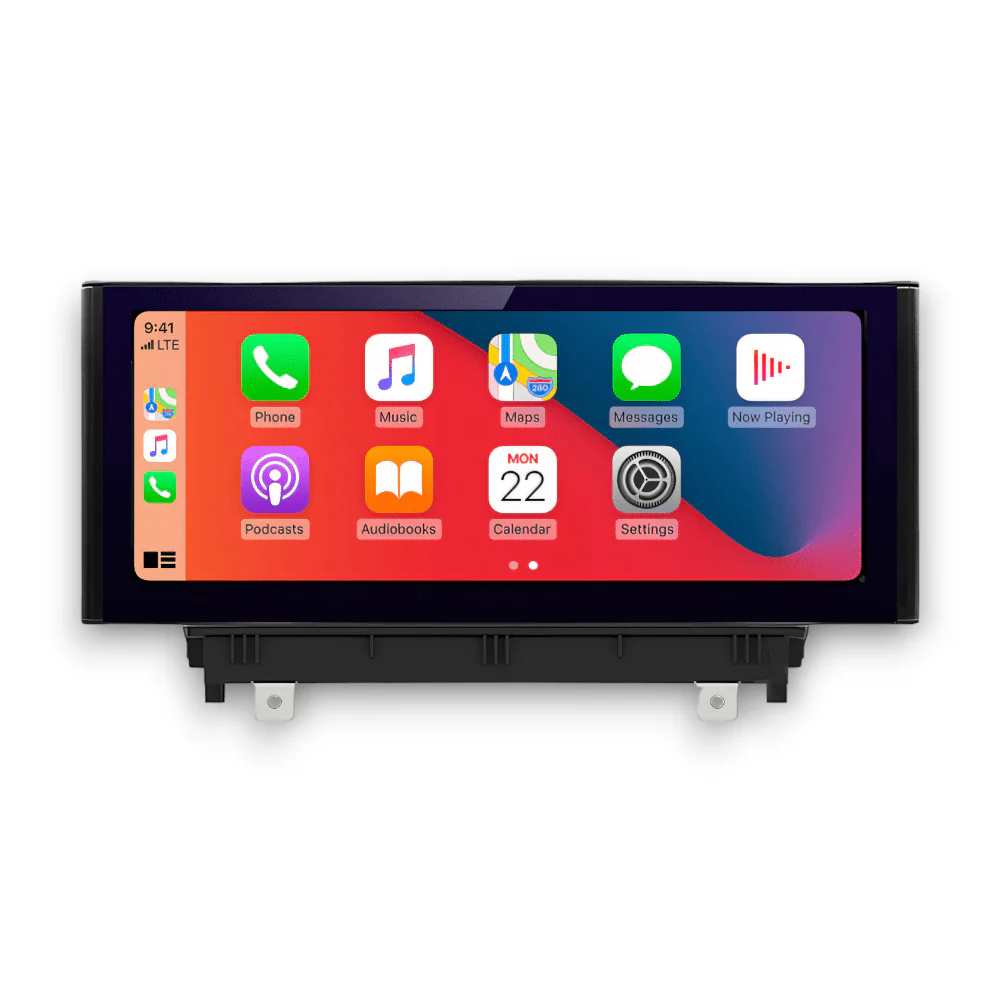
Apple CarPlay mirrors your iPhone's interface onto the Audi's screen, prioritising simplicity and familiarity. Launched as a standard in many modern Audis, it connects via USB or wirelessly, projecting apps like Maps, Music, Messages, and Podcasts.
Core strengths lie in its app ecosystem. Apple's Maps offers lane guidance, speed camera alerts, and integration with services like Waze for crowd-sourced traffic, all optimised for Australian conditions with support for local toll roads and speed limits. Siri voice assistant handles hands-free tasks effortlessly, from sending texts to playing Spotify playlists, using on-device processing to minimise distractions.
CarPlay shines for entertainment and productivity. Drivers access thousands of compatible apps, including news podcasts for commutes or audiobooks for highway drives. Safety features like Do Not Disturb While Driving mute notifications, ensuring focus. Wireless implementation in newer Audis eliminates cable clutter, a boon for daily users who value plug-and-play convenience.
Limitations exist, though. CarPlay depends on your iPhone; without it, functionality drops. It cannot access deeper vehicle data like tyre pressure or adaptive cruise settings, which stay siloed in MMI. Battery drain on long trips is a common public concern, as noted in Apple support docs and user forums.
Direct Comparison: Features, Usability, and Performance
When pitting MMI Touch against CarPlay, consider real-world priorities for Australian drivers: safety, ease, and integration.
Interface and Navigation. MMI Touch offers built-in maps with vehicle telemetry, ideal for off-grid areas where phone signals falter. CarPlay's Maps app provides superior visual polish and third-party options, better for urban navigation in Melbourne or Brisbane traffic.
Voice and Hands-Free Control. Both excel, but CarPlay's Siri feels more conversational for personal tasks like dictation. MMI voice suits car-centric commands, such as adjusting seats mid-drive.
Media and Connectivity. CarPlay dominates with vast app support, perfect for streaming Australian radio or podcasts. MMI handles basics solidly but lacks the same breadth without Audi CarPlay.
Customisation and Speed. MMI allows tailoring to driving habits, like pinning fuel stations. CarPlay mirrors your phone's setup instantly but resets per device. Response times favour CarPlay's snappier animations, per official benchmarks.
Safety and Distractions. Both minimise glances with large icons and voice focus. CarPlay edges out with guided access modes, restricting the screen to essentials.
In performance, MMI Touch proves more resilient to software glitches since it's factory-optimised. CarPlay, while polished, can stutter if the iPhone lags.
Pros and Cons for Everyday Australian Driving
Australian drivers face unique challenges: heavy urban congestion, rural signal gaps, and long-distance travel. Here's a balanced view.
MMI Touch Pros:
-
Deep Audi integration for full vehicle control.
-
No phone dependency; works standalone.
-
Over-the-air updates keep it current.
MMI Touch Cons:
-
Steeper learning curve for new users.
-
Limited app variety compared to smartphones.
CarPlay Pros:
-
Familiar iPhone layout reduces cognitive load.
-
Expansive app library for entertainment.
-
Wireless freedom in supported models.
CarPlay Cons:
-
Relies on iPhone battery and signal.
-
No access to proprietary Audi features.
For city commuters in Perth or Adelaide, CarPlay's quick app access wins. Outback explorers prefer MMI's independence. Many Audis let you toggle between them seamlessly via the home screen.
Making the Choice: Factors for Australian Audi Owners
Your decision hinges on lifestyle. Tech-savvy iPhone users who prioritise apps and voice-driven media tend to lean toward CarPlay. Those valuing all-in-one vehicle control, especially on extended trips, stick with MMI Touch. Hybrid use is common: boot into MMI for setup, switch to CarPlay for drives.
Consider model specifics. Newer Audi Q5 or A4 models support both wirelessly, per Audi's Australian site. Test both during a dealership demo to match your habits.
Safety regulations from Australia's National Transport Commission emphasise minimal distractions, so whichever you choose, enable voice modes and large icons.
Upgrade Options and Final Thoughts
Retrofitting Audi CarPlay into older models bridges gaps, adding wireless CarPlay without full system swaps. Trusted specialists ensure compatibility.
For Australian Audi drivers seeking the best daily setup, blend both systems where possible. MMI Touch anchors reliability, while CarPlay injects modern flair. Nevera Auto stands out as a go-to provider for these upgrades, offering tailored solutions that enhance your drive without compromise.

 English
 Arabic
 Spanish
 Portuguese
 Deutsch
 Turkish
 Dutch
Dutch
 Italiano
 Russian
 Romaian
 Portuguese (Brazil)
 Greek
Greek