

How Regular Computer Maintenance Can Extend the Life of Your Device
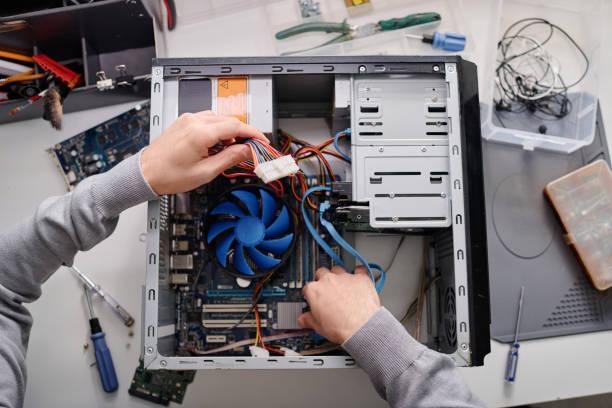
Most people only think about their computer when something goes wrong. The laptop starts freezing, programs take forever to open, or strange errors suddenly appear. By that point, frustration usually replaces convenience.
The reality is that computers, like cars or household appliances, need regular care to perform properly. Ignoring maintenance for months or years can gradually slow a system down and increase the risk of expensive repairs. Whether you use your device for work, business, gaming, studying, or everyday browsing, regular computer maintenance can significantly improve performance and help extend the life of your device. Small maintenance habits today can prevent major problems tomorrow.
Why Computer Maintenance Matters
Every computer collects digital clutter over time. Temporary files build up, applications run in the background, software becomes outdated, and dust begins collecting inside hardware components. None of these problems seem serious at first. However, over time they create extra strain on the system.
Regular maintenance helps:
-
Improve performance
-
Reduce slowdowns
-
Prevent unexpected crashes
-
Lower overheating risks
-
Improve security
-
Extend hardware lifespan
-
Reduce costly repairs
Many computer problems develop gradually rather than appearing overnight. Routine care helps identify issues before they become major headaches.
Computers Naturally Slow Down Over Time
Many users believe a slow computer automatically means it is old and needs replacing. That is not always true. In many cases, systems become slower because of neglected maintenance rather than hardware failure.
As months pass, computers collect:
-
Unused programs
-
Temporary files
-
Startup applications
-
Browser data
-
Background processes
All of these consume storage and system resources.
Without maintenance, even powerful computers can begin feeling sluggish.
Keep Your Software Updated
Software updates are often ignored because people dislike interruptions. Many click "remind me later" repeatedly. However, updates exist for important reasons.
Software updates often include:
-
Security improvements
-
Bug fixes
-
Performance enhancements
-
Compatibility updates
-
System stability improvements
Outdated software can create vulnerabilities and reduce performance. Operating systems, drivers, browsers, and applications should all remain updated regularly. A few minutes spent updating can prevent hours of future problems.
Remove Programs You No Longer Use
Most computers contain applications installed months or even years ago. Some users forget they exist entirely. Unused programs occupy storage space and sometimes continue running background services. Take time occasionally to review installed software.
Ask yourself:
-
Do I still use this?
-
Does this application start automatically?
-
Is it necessary?
Removing unnecessary software helps free system resources.
A cleaner system often performs better.
Manage Startup Programs
One common reason computers become slow is startup overload. Many applications automatically launch when the computer turns on. Users may not even realize it. When too many programs start together, devices take longer to boot and consume memory immediately.
Examples include:
-
Messaging apps
-
Cloud services
-
Gaming launchers
-
Utility tools
-
Software updaters
Reducing startup programs can noticeably improve speed.
Clean Temporary and Junk Files
Temporary files exist for useful reasons. They help programs run efficiently while performing tasks. However, they are not designed to remain forever.
Over time, temporary data accumulates and consumes storage.
Cleaning unnecessary files can:
-
Free disk space
-
Improve speed
-
Reduce system clutter
-
Improve responsiveness
Built-in cleanup tools often handle this quickly. Many users are surprised by how much unnecessary data builds up over time.
Protect Your Computer From Malware
Security is also part of maintenance. Viruses and malware do not always announce themselves clearly. Some quietly run in the background while affecting performance.
Signs of malware may include:
-
Slow system behavior
-
Unexpected pop-ups
-
Browser redirects
-
Random crashes
-
Increased resource usage
Regular antivirus scans help detect threats early. Good security habits help extend device life by preventing system damage.
Dust Can Become a Hidden Problem
Many people focus only on software while forgetting physical maintenance. Dust is one of the most overlooked computer issues.
Inside desktops and laptops, dust gradually collects around:
-
Cooling fans
-
Air vents
-
Internal components
-
Heat sinks
As airflow becomes restricted, temperatures rise.
Excess heat places additional strain on hardware.
Overheating may lead to:
-
Random shutdowns
-
Reduced performance
-
Fan noise
-
Hardware damage
Regular cleaning helps maintain proper airflow. This becomes especially important for gaming systems and high-performance devices.
Battery Care Matters Too
Laptop batteries naturally lose capacity over time. While aging is normal, poor charging habits can accelerate wear.
Helpful battery habits include:
-
Avoid constant overheating
-
Use quality chargers
-
Avoid full discharge repeatedly
-
Keep software updated
Small changes can help maintain battery health longer.
Monitor Storage Space
Nearly full storage can slow down performance significantly.
Computers need free space for:
-
Temporary operations
-
Updates
-
Virtual memory
-
System processes
When storage becomes crowded, systems often feel less responsive.
Regularly review:
-
Downloads folder
-
Duplicate files
-
Large unused files
-
Old media content
Freeing space helps systems run more efficiently.
Backup Important Data Regularly
Maintenance is not only about speed. Protecting information matters too.
Unexpected events happen:
-
Hard drive failures
-
Accidental deletion
-
Malware attacks
-
Software corruption
Regular backups reduce stress when problems occur.
Store important data using:
-
External drives
-
Cloud storage
-
Secondary devices
Good backup habits protect both personal and business information.
Warning Signs Your Computer Needs Attention
Many computers show warning signs before major problems develop.
Watch for symptoms such as:
-
Slower startup times
-
Frequent freezing
-
Loud fan noise
-
Applications crashing
-
Overheating
-
Unexpected error messages
Ignoring these signs can lead to larger repair costs later.
Early maintenance often solves smaller problems quickly.
Common Maintenance Mistakes People Make
Even users who try maintaining their systems sometimes make mistakes.
Avoid these common habits:
Ignoring Updates
Delaying updates too long can create security risks.
Installing Too Many Optimization Programs
Some unnecessary tools consume resources instead of improving performance.
Forgetting Physical Cleaning
Dust buildup often goes unnoticed.
Waiting Until Problems Become Severe
Preventive maintenance is far easier than emergency repairs.
Final Thoughts
Computers play a major role in daily life. From work and business tasks to education and entertainment, people rely on their devices constantly. Like any machine, computers perform better when they receive regular care. Simple habits such as cleaning unnecessary files, managing software, keeping systems updated, and protecting against security threats can dramatically improve performance and extend device lifespan. You do not always need expensive upgrades or repairs. Sometimes regular computer maintenance is all it takes to keep a device running smoothly for years.

 English
 Arabic
 French
 Spanish
 Portuguese
 Deutsch
 Turkish
 Dutch
Dutch
 Russian
 Romaian
 Portuguese (Brazil)
 Greek
Greek